<?xml version="1.0" encoding="utf-8"?>
<feed xmlns="http://www.w3.org/2005/Atom">
	<title type="html"><![CDATA[Форум Guardant &mdash; Windows не удается загрузить программу GuardantDongles.]]></title>
	<link rel="self" href="https://forum.guardant.ru/feed/atom/topic/147/" />
	<updated>2012-01-26T12:40:08Z</updated>
	<generator>PunBB</generator>
	<id>https://forum.guardant.ru/topic/147/</id>
		<entry>
			<title type="html"><![CDATA[Re: Windows не удается загрузить программу GuardantDongles.]]></title>
			<link rel="alternate" href="https://forum.guardant.ru/post/667/#p667" />
			<content type="html"><![CDATA[<div class="quotebox"><cite>Антон Тихиенко пишет:</cite><blockquote><div class="quotebox"><cite>shift пишет:</cite><blockquote><p><span class="postimg"><a class="fancybox fancybox.image" rel="group" href="https://forum.guardant.ru/uploads/legacy/0/500/665/p16jtigq1f138c1s1dr52svgg1f2.png"><img class="fb_img" src="https://forum.guardant.ru/uploads/legacy/0/500/665/thumb/p16jtigq1f138c1s1dr52svgg1f2.png" alt="" /></a></span><span class="postimg"><a class="fancybox fancybox.image" rel="group" href="https://forum.guardant.ru/uploads/legacy/0/500/665/p16jtigq1f7bdgoi36j1dkadbj1.png"><img class="fb_img" src="https://forum.guardant.ru/uploads/legacy/0/500/665/thumb/p16jtigq1f7bdgoi36j1dkadbj1.png" alt="" /></a></span></p></blockquote></div><p>Если после выполнения ВСЕХ вышеперечисленных рекомендаций (откат системы, чистка ОС при помощи&nbsp; Installer CleanUp) возникает подобная ошибка то, это, скорее всего, свидетельствует о слишком глубоком повреждении стека устройств или драйверной подсистемы Windows. В таком случае остается лишь порекомендовать полную переустановку ОС.<br />Стоит отметить, что подобные проблемы часто возникают после неудачной попытки установить разнообразные эмуляторы Guardant.<br />Если таковые устанавливались, то можно еще попробовать почистить ОС от следов их установки и снова попробовать установить драйвер Guardant.</p></blockquote></div><p>В том и дело, что ставился драйвер ключа на вновь установленную систему. CleanUp не показал следов Guardant, а эмуляторы и в помине не применялись.</p>]]></content>
			<author>
				<name><![CDATA[shift]]></name>
				<uri>https://forum.guardant.ru/user/320/</uri>
			</author>
			<updated>2012-01-26T12:40:08Z</updated>
			<id>https://forum.guardant.ru/post/667/#p667</id>
		</entry>
		<entry>
			<title type="html"><![CDATA[Re: Windows не удается загрузить программу GuardantDongles.]]></title>
			<link rel="alternate" href="https://forum.guardant.ru/post/666/#p666" />
			<content type="html"><![CDATA[<div class="quotebox"><cite>shift пишет:</cite><blockquote><p><span class="postimg"><a class="fancybox fancybox.image" rel="group" href="https://forum.guardant.ru/uploads/legacy/0/500/665/p16jtigq1f138c1s1dr52svgg1f2.png"><img class="fb_img" src="https://forum.guardant.ru/uploads/legacy/0/500/665/thumb/p16jtigq1f138c1s1dr52svgg1f2.png" alt="" /></a></span><span class="postimg"><a class="fancybox fancybox.image" rel="group" href="https://forum.guardant.ru/uploads/legacy/0/500/665/p16jtigq1f7bdgoi36j1dkadbj1.png"><img class="fb_img" src="https://forum.guardant.ru/uploads/legacy/0/500/665/thumb/p16jtigq1f7bdgoi36j1dkadbj1.png" alt="" /></a></span></p></blockquote></div><p>Если после выполнения ВСЕХ вышеперечисленных рекомендаций (откат системы, чистка ОС при помощи&nbsp; Installer CleanUp) возникает подобная ошибка то, это, скорее всего, свидетельствует о слишком глубоком повреждении стека устройств или драйверной подсистемы Windows. В таком случае остается лишь порекомендовать полную переустановку ОС.<br />Стоит отметить, что подобные проблемы часто возникают после неудачной попытки установить разнообразные эмуляторы Guardant.<br />Если таковые устанавливались, то можно еще попробовать почистить ОС от следов их установки и снова попробовать установить драйвер Guardant.</p>]]></content>
			<author>
				<name><![CDATA[Антон Тихиенко]]></name>
				<uri>https://forum.guardant.ru/user/31/</uri>
			</author>
			<updated>2012-01-24T12:16:02Z</updated>
			<id>https://forum.guardant.ru/post/666/#p666</id>
		</entry>
		<entry>
			<title type="html"><![CDATA[Re: Windows не удается загрузить программу GuardantDongles.]]></title>
			<link rel="alternate" href="https://forum.guardant.ru/post/665/#p665" />
			<content type="html"><![CDATA[<p><span class="postimg"><a class="fancybox fancybox.image" rel="group" href="https://forum.guardant.ru/uploads/legacy/0/500/665/p16jtigq1f138c1s1dr52svgg1f2.png"><img class="fb_img" src="https://forum.guardant.ru/uploads/legacy/0/500/665/thumb/p16jtigq1f138c1s1dr52svgg1f2.png" alt="" /></a></span><span class="postimg"><a class="fancybox fancybox.image" rel="group" href="https://forum.guardant.ru/uploads/legacy/0/500/665/p16jtigq1f7bdgoi36j1dkadbj1.png"><img class="fb_img" src="https://forum.guardant.ru/uploads/legacy/0/500/665/thumb/p16jtigq1f7bdgoi36j1dkadbj1.png" alt="" /></a></span></p>]]></content>
			<author>
				<name><![CDATA[shift]]></name>
				<uri>https://forum.guardant.ru/user/320/</uri>
			</author>
			<updated>2012-01-20T12:52:52Z</updated>
			<id>https://forum.guardant.ru/post/665/#p665</id>
		</entry>
		<entry>
			<title type="html"><![CDATA[Re: Windows не удается загрузить программу GuardantDongles.]]></title>
			<link rel="alternate" href="https://forum.guardant.ru/post/664/#p664" />
			<content type="html"><![CDATA[<div class="quotebox"><cite>Антон Тихиенко пишет:</cite><blockquote><p>В данном случае следует выполнить откат системы (System Restore) на момент до начала любых манипуляций с драйверами Guardant.</p><p>Если же проблема после этого не уйдёт, то рекомендую воспользоваться стандартным в подобных ситуациях алгоритмом действий, а именно:</p><p>1. Отсоедините ключ.<br />2. Скачайте, установите и запустите утилиту Windows Installer CleanUp. Скачать её можно здесь: <a href="http://www.softpedia.com/get/Security/Secure-cleaning/Windows-Installer-CleanUp-Utility.shtml">http://www.softpedia.com/get/Security/S … lity.shtml</a>&nbsp; &nbsp; &nbsp; &nbsp; <br />3. Выберите все &quot;Guardant-содержащие&quot; пункты и деинсталлируйте их.<br />4. Перезагрузите компьютер.<br />5. Скачайте с нашего сайта драйвера соответствующей разрядности и установите их. Скачать их можно здесь: <a href="https://www.guardant.ru/support/download/drivers/">https://www.guardant.ru/support/download/drivers/</a>&nbsp; &nbsp; &nbsp;<br />6. После успешной установки драйверов подсоедините ключ.</p></blockquote></div><p><a href="https://forum.guardant.ru/uploads/legacy/users/1000/320/tmp/thumb/p16jtigq1f7bdgoi36j1dkadbj1.png">https://forum.guardant.ru/uploads/legac … kadbj1.png</a><br /><a href="https://forum.guardant.ru/uploads/legacy/users/1000/320/tmp/thumb/p16jtigq1f138c1s1dr52svgg1f2.png">https://forum.guardant.ru/uploads/legac … vgg1f2.png</a></p>]]></content>
			<author>
				<name><![CDATA[shift]]></name>
				<uri>https://forum.guardant.ru/user/320/</uri>
			</author>
			<updated>2012-01-20T12:51:27Z</updated>
			<id>https://forum.guardant.ru/post/664/#p664</id>
		</entry>
		<entry>
			<title type="html"><![CDATA[Re: Windows не удается загрузить программу GuardantDongles.]]></title>
			<link rel="alternate" href="https://forum.guardant.ru/post/663/#p663" />
			<content type="html"><![CDATA[<p>В данном случае следует выполнить откат системы (System Restore) на момент до начала любых манипуляций с драйверами Guardant.</p><p>Если же проблема после этого не уйдёт, то рекомендую воспользоваться стандартным в подобных ситуациях алгоритмом действий, а именно:</p><p>1. Отсоедините ключ.<br />2. Скачайте, установите и запустите утилиту Windows Installer CleanUp. Скачать её можно здесь: <a href="http://www.softpedia.com/get/Security/Secure-cleaning/Windows-Installer-CleanUp-Utility.shtml">http://www.softpedia.com/get/Security/S … lity.shtml</a>&nbsp; &nbsp; &nbsp; &nbsp; <br />3. Выберите все &quot;Guardant-содержащие&quot; пункты и деинсталлируйте их.<br />4. Перезагрузите компьютер.<br />5. Скачайте с нашего сайта драйвера соответствующей разрядности и установите их. Скачать их можно здесь: <a href="https://www.guardant.ru/support/download/drivers/">https://www.guardant.ru/support/download/drivers/</a>&nbsp; &nbsp; &nbsp;<br />6. После успешной установки драйверов подсоедините ключ.</p>]]></content>
			<author>
				<name><![CDATA[Антон Тихиенко]]></name>
				<uri>https://forum.guardant.ru/user/31/</uri>
			</author>
			<updated>2012-01-20T07:23:20Z</updated>
			<id>https://forum.guardant.ru/post/663/#p663</id>
		</entry>
		<entry>
			<title type="html"><![CDATA[Re: Windows не удается загрузить программу GuardantDongles.]]></title>
			<link rel="alternate" href="https://forum.guardant.ru/post/662/#p662" />
			<content type="html"><![CDATA[<p>Да.</p>]]></content>
			<author>
				<name><![CDATA[shift]]></name>
				<uri>https://forum.guardant.ru/user/320/</uri>
			</author>
			<updated>2012-01-19T14:04:39Z</updated>
			<id>https://forum.guardant.ru/post/662/#p662</id>
		</entry>
		<entry>
			<title type="html"><![CDATA[Re: Windows не удается загрузить программу GuardantDongles.]]></title>
			<link rel="alternate" href="https://forum.guardant.ru/post/661/#p661" />
			<content type="html"><![CDATA[<p>Здравствуйте.</p><p>Уточните, пожалуйста, данная ошибка (Guardant Dongles) появляется во время установки драйвера электронного ключа Guardant?</p>]]></content>
			<author>
				<name><![CDATA[Антон Тихиенко]]></name>
				<uri>https://forum.guardant.ru/user/31/</uri>
			</author>
			<updated>2012-01-19T13:48:22Z</updated>
			<id>https://forum.guardant.ru/post/661/#p661</id>
		</entry>
		<entry>
			<title type="html"><![CDATA[Windows не удается загрузить программу GuardantDongles.]]></title>
			<link rel="alternate" href="https://forum.guardant.ru/post/660/#p660" />
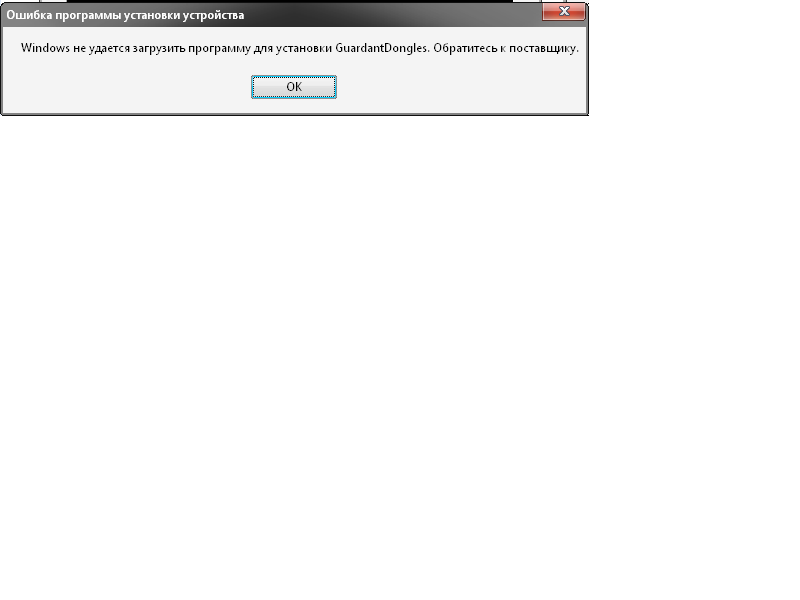
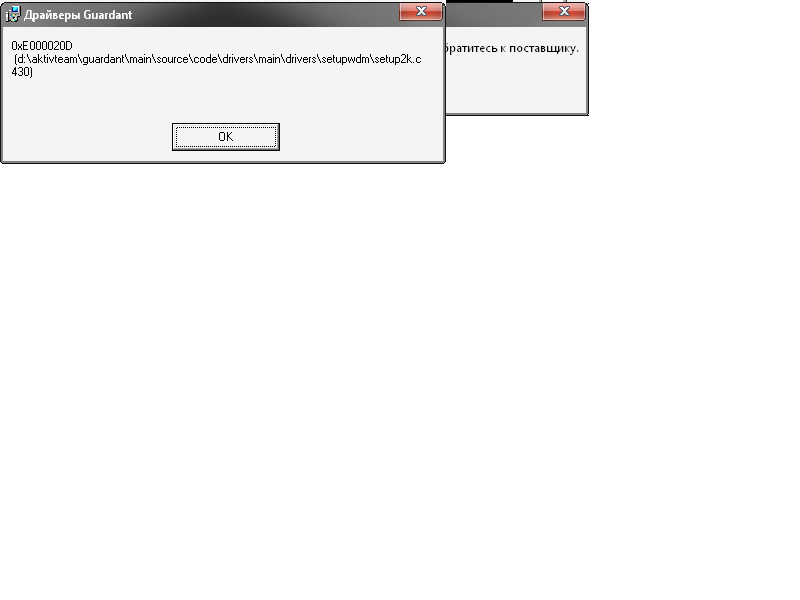
			<content type="html"><![CDATA[<p>На ноутбуке стоит WinXP x32. Драйверы разных версий пробовал ставить. Ругается на Guardant Dongles. При установке ключа в ветке устройств появляется Guardant Dongles и сам ключ, но он не работает.</p>]]></content>
			<author>
				<name><![CDATA[shift]]></name>
				<uri>https://forum.guardant.ru/user/320/</uri>
			</author>
			<updated>2012-01-19T13:22:00Z</updated>
			<id>https://forum.guardant.ru/post/660/#p660</id>
		</entry>
</feed>